Assemble 
Assemble Action is for combining multiple of alembic files into the scene at the same time.
Acting as kind of a stage manager, it only updates the existing hierarchy, so the order of Alembic files actually matters.
If grouping hierarchy matches between alembics, instead of creating copies of the same structure over and over, it uses the existing one. This makes it very useful for combining different assets which will be united in a single rig without the need of extra clean-up scripts.
Button Functions
Add: Brings up the browser menu to add a new alembic cache file
Next Version: Switches to the next version of selected alembic file, if there is any. Yellow means that either the file name does not have a version info or it is not the latest version.
Previous Version: Switches to the previous version of selected alembic file
Remove: Removes the selected alembic file from the list. This does not delete the actual file in the file system. Just removes the Trigger definition
Clear: Removes everything from the list.
Tip
Ctrl + Up Arrow and Ctrl + Down Arrow Keys move between versions if v<digit> format extension used for version file names.
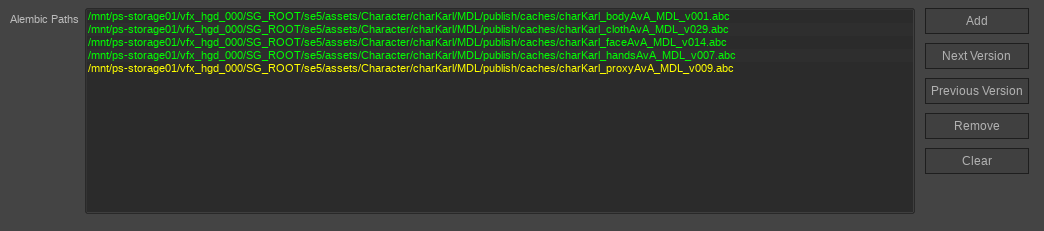
Note that the all parts of except from the proxyAvA are the latest versions.
In the example above, we are combining body, cloth, face, hands and proxy parts of a single character coming from different alembic caches. Since they share the same group hierarchy, they will simply assembled into a single hierarchy chain.